R0.00 0

Basket

No products in the basket.

How to download certificates?

People are very happy when they get a certificate after completing a course. Keeping in mind this happy moment for people, FTI Academy has arranged a Certificate system. This doc is about how to download certificates in FTI Academy.

All the time, when you complete a course in FTI Academy you will get a certificate. This certificate is generated automatically from your Instructor.

Now I will go through all the processes of how you will download the FTI Academy course certificate after completing a course.
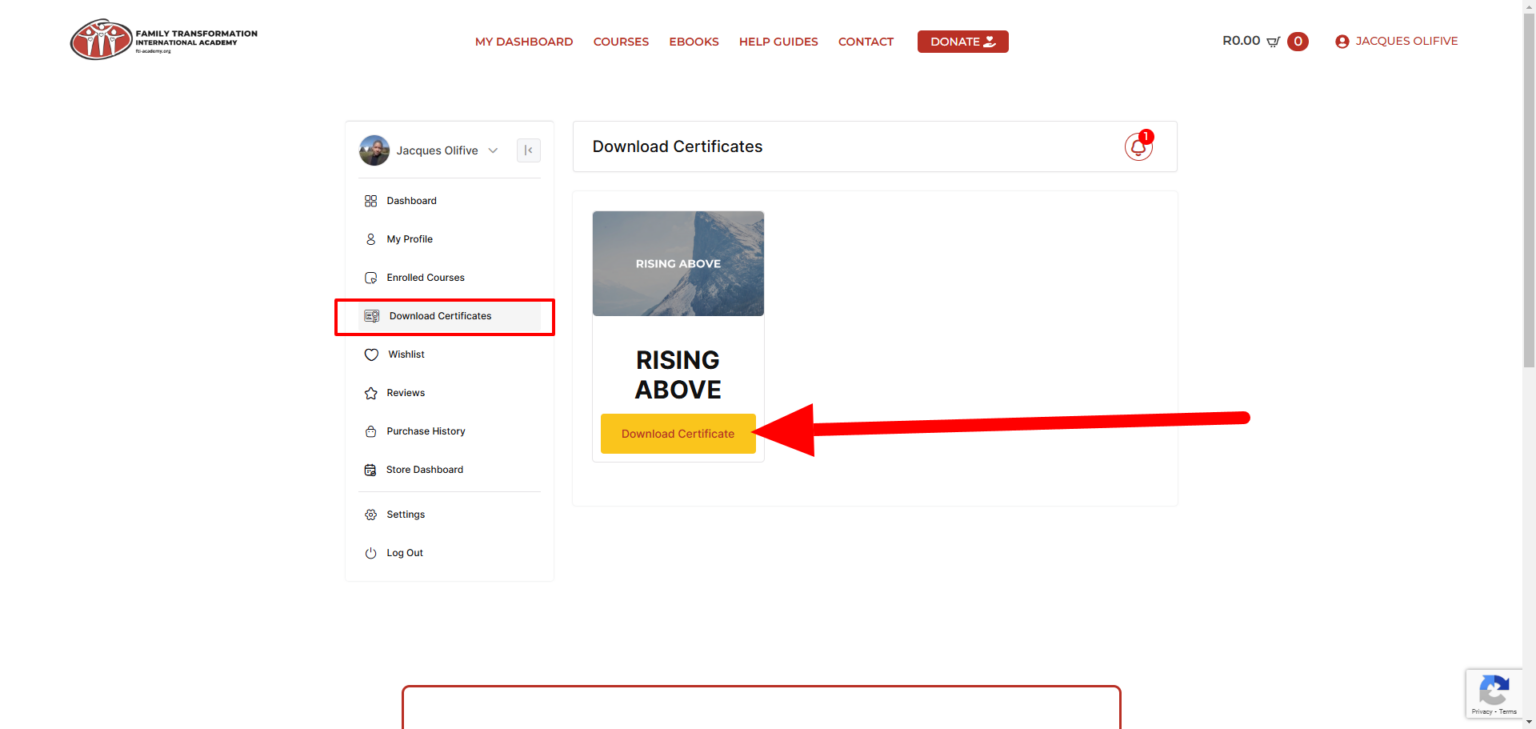
  • Step 1. Log in to your FTI Academy account. Visit your dashboard.
  • Step 2. After logging in click on the  Download Certificates from the dashboard menu.
  • Step 3. Now select one of your courses that is 100% Complete.

Enrolled Courses
  • Step 4. View your certificate, ensure that your name is correct as it’s on your profile within the FTI Academy platform. You will then receive a certificate that could look something like this for you to download and store locally on your PC, Laptop or Cellphone:

After clicking on the complete course you will get your certificate download button.

© 2024 FTI Academy. All rights reserved.
website design by 19 Digital

Welcome To FTI Academy!

IMPORTANT NOTICE

Are you new to the please register using the button below or visit our help guides for more information.

Hello, Let's Login!

Do not have an account?
Register Here!